

 The problem: the case is in Salesforce, the fix lives in Azure DevOps
A support agent working a Salesforce case confirms it's a software bug. Engineering needs to fix it — but engineering works in Azure DevOps, not Salesforce. Right now, someone copies the case details into a new Azure DevOps work item: title, description, repro steps, priority, attachments. Then they paste the work item link back into the Salesforce case. Then they spend the next week manually relaying comments, status changes, and resolution between two systems that were never designed to share a record.
Every escalation. Every update. By hand.
Why manual Salesforce-to-Azure DevOps handoffs break at scale
The copy-paste relay doesn't just cost time — it fails in specific, predictable ways once escalation volume goes up:
- Routing goes wrong. Without structured logic, escalated cases land in the wrong Azure DevOps project, the wrong work item type, or the wrong team. Engineering triages the case a second time just to figure out where it belongs.
- Fields get lost in translation. Custom fields, repro steps, and environment details get dropped or mangled. Engineering reopens the case asking for context the agent already had — burning time on both sides.
- Duplicates pile up. Three agents hit the same bug and create three separate work items because nobody can see what's already in the backlog. Engineering triages the same defect three times.
- Status goes stale. Engineering resolves the work item on Tuesday; the Salesforce case still reads "In Progress" on Thursday because nobody updated it. Support tells the customer the wrong thing.
- Internal comments leak. A developer's candid note about a workaround ends up in the customer-facing case feed because comment visibility wasn't controlled at the sync boundary.
None of this is a people problem. It's an integration problem.
How a Salesforce–Azure DevOps integration solves it
A Salesforce Azure DevOps integration connects the case on the support side to the work item on the engineering side, so the escalation and every update after it flow automatically, both ways, in real time. Here's the flow, end to end:
1. The agent identifies a case that needs engineering
A confirmed bug, a feature request, a defect that needs a code fix. Everything the agent knows is already on the Salesforce case.
2. Search before creating
From inside Salesforce, the agent searches Azure DevOps for an existing work item that matches the issue. If one exists, they link it to the case — no duplicate. This single step eliminates the "three agents, three work items for one bug" problem.
3. One-click escalation with granular routing
If there's no match, one click creates the Azure DevOps work item. But unlike a manual copy, the integration uses customer-defined routing logic based on Salesforce case field values to determine:
- Which Azure DevOps project receives the work item
- What work item type to create — bug, user story, task, feature, epic, or a custom work item type
- Area path and iteration — placing the work item in the right team's backlog from the start
- Team or feature owner assignment — based on product line, region, severity, or any other case field
This routing is configured once and applied automatically on every escalation. Cases land in the right place the first time instead of being re-triaged by engineering.
4. Field mapping — standard, custom, and bidirectional
The integration maps Salesforce case fields to Azure DevOps work item fields — standard or custom, in either direction. The most commonly mapped fields:
- Case Title → Work Item Title and Description → Description / Repro Steps
- Priority, Severity, Environment — mapped to their ADO equivalents or custom fields
- Salesforce Case Number → custom ADO field (so the developer sees which customer reported it)
- Customer Name, Account → custom ADO fields for context
- Salesforce fields → Azure DevOps Tags (for filtering and board views)
And it works the other way too — Quantum Whisper provides out-of-the-box custom fields in Salesforce that track ADO work item details directly on the case:
- Work Item ID, State, Reason — visible to the agent without leaving Salesforce
- Work Item Link — a direct URL to the ADO item for anyone who does need to look
5. Attachments and comments sync bidirectionally
Attachments added to the Salesforce case push to Azure DevOps automatically — and vice versa. No more "can you re-send that log file?"
Case comments and feed posts from Salesforce sync as Azure DevOps conversations. ADO conversations sync back to Salesforce. Critically, you control comment visibility: a developer's internal note can land as an internal comment in Salesforce rather than a customer-facing update.
6. Engineering works entirely in Azure DevOps
Developers get the full case context on the work item — description, priority, attachments, custom fields — and work it exactly how they normally do in Azure Boards. No Salesforce login, no context-switching, no new tool to adopt.
7. The loop closes in real time
When the work item's state changes (active → resolved → closed), the Salesforce case reflects it instantly. Resolution details, release information, and final comments sync back so the agent closes the case and updates the customer — same day, with accurate information, without chasing an engineer.
How Quantum Whisper does it differently
Quantum Whisper is a packaged, no-code integration built for exactly this job: escalating support cases from Salesforce to Azure DevOps. The routing logic, field mappings, and event-driven bidirectional sync are pre-built — updates propagate the moment a record changes, not on a polling interval. You connect your Salesforce org and your Azure DevOps organization, configure your mappings and routing rules, and go live. Most teams are up in about 60 minutes — no custom code, no scripting, no professional-services engagement.
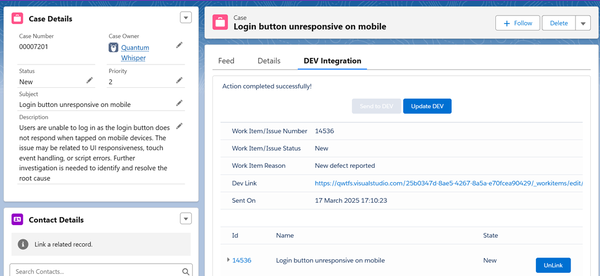
It creates any Azure DevOps work item type, including custom types; runs as an Azure cloud service; supports Azure DevOps Services (cloud) and Azure DevOps Server (on-premise); and is listed on the Salesforce AppExchange and Microsoft AppSource. Guided implementation is included with every subscription.
Where Quantum Whisper wins — and where it doesn't
Two other tools show up when teams evaluate this integration. Here's the honest comparison.
vs. Exalate. Exalate is the most flexible option on the market. It syncs any Salesforce object (cases, opportunities, accounts, custom objects) to any Azure DevOps work item type via a Groovy script engine, now assisted by their AI tool Aida. That scripting flexibility is genuine — for cross-company sync, MSP scenarios, or deeply custom logic, it's hard to beat. But it comes at a cost: Pro plans for Salesforce integrations start at $550/month, and getting past basic mappings means owning a scripting model (even with AI assistance). Choose Quantum Whisper when a support or engineering manager wants the packaged case-escalation workflow live today without a scripting project; choose Exalate when you need deep custom logic, cross-organization sync governance, or you're syncing non-case objects (opportunities, accounts) and have the technical resource to maintain scripts.
vs. ZigiWave (ZigiOps). ZigiOps is a capable no-code platform with strong security credentials (ISO 27001, zero data storage). Two architectural differences worth weighing: for Salesforce–Azure DevOps, ZigiOps typically runs on polling triggers — checking each system on an interval and syncing what changed. Quantum Whisper is event-driven, so updates propagate the moment the record changes, with no polling lag. Second, ZigiOps is a broad integration platform spanning ITSM, monitoring, and DevOps tools, frequently deployed as self-hosted software; Quantum Whisper is purpose-built for support-to-engineering case escalation and runs as a fully hosted cloud service with nothing to install. Choose Quantum Whisper for event-driven, fully hosted, escalation-focused sync with guided setup; choose ZigiOps if you need a broad self-hosted hub connecting many sources beyond the support-to-dev flow.
(Competitor details verified against public vendor documentation, mid-2026. Confirm current capabilities directly during evaluation.)
What it's worth: the ROI math
Take a support team escalating 150 cases a month to engineering. If each escalation costs ~15 minutes of combined agent and developer time over its lifecycle — creating the work item, chasing status, re-typing comments, reconciling state — that's roughly 37 hours a month of pure relay work, before SLA penalties and customer-trust costs. Automating the sync recovers that time and removes the status lag that causes breaches in the first place.
Run your own numbers with the integration ROI calculator before you talk to any vendor, us included.
Frequently asked questions
How do I escalate a Salesforce case to Azure DevOps? Connect both systems through a packaged connector, map your Salesforce case fields to Azure DevOps work item fields, and define your routing rules (which project, which work item type, which team). With Quantum Whisper, this is point-and-click — most teams are live in about 60 minutes with no custom code.
Can I control which Azure DevOps project and work item type a case escalates to? Yes. Routing rules use Salesforce case field values (product, severity, region, or any custom field) to automatically direct the escalation to the right project, area path, iteration, and work item type — bug, user story, task, feature, epic, or custom.
Does the sync work in real time? Quantum Whisper uses event-driven sync — updates propagate the moment a record changes in either system, not on a polling cycle. Status, comments, and resolution flow bidirectionally without lag.
Can I map custom fields between Salesforce and Azure DevOps? Yes — any combination of standard and custom fields, in either direction. Attachments, comments, and tags also sync bidirectionally, with control over comment visibility (internal vs. customer-facing).
Does it support Azure DevOps Server (on-premise)? Yes. Quantum Whisper supports both Azure DevOps Services (cloud) and Azure DevOps Server (on-premise, formerly TFS).
How is this different from building it with MuleSoft, Power Automate, or a custom API integration? A hand-built flow works until the API changes, your routing logic grows, or someone has to maintain it. Purpose-built connectors like Quantum Whisper are maintained products with guided implementation, version-safe sync, and bidirectional case management built in — so your team doesn't own the plumbing.
Ready to close the gap between Salesforce and Azure DevOps?
See the packaged Salesforce Azure DevOps connector in action, or book a demo and we'll map it to your exact escalation workflow.
Related reading: why enterprises integrate Salesforce with Azure DevOps.